
The author is corporate IT specialist for Crawford Broadcasting.
You may have seen the recent headlines about the PHP2Shell vulnerability. As the name implies, a specially crafted attack could gain shell (the equivalent of command-line execution) access.

This one was so serious that a bunch of websites around the world were abruptly taken offline until the patch was available. An attacker could simply craft a bogus HTML request that would sail right into the server, ignoring firewalls and other protection.
[Related: Is Your Manufacturer Affected by the PHP Vulnerability?]
Our company’s websites use PHP to build pages on the fly; it’s a handy, powerful tool. WordPress, Joomla and other content managers use it.
Other tool kits are available and are starting to eat into its share of servers, but PHP is still widely used worldwide (70% of current websites, according to one source).
The standard Cybersecurity and Infrastructure Security Agency (CISA) approach is to (1) identify the vulnerability with a proof of concept for an attack, (2) then notify the vendor. Once a patch is created, you tell everyone to install it ASAP.
In this case, someone leaked the details early (!!), so the dark web jumped on it (no doubt cackling all the while). PHP2Shell was being exploited before the patch was available. Thus, CISA rated PHP2Shell as a 9.8 out of 10 for severity.
This affected every version of PHP from 5.4 to the current 8.5 release. The fix was originally scheduled for release on Oct. 20, but Rocky Linux (which we use) delayed its patch until the next day.
I went into our web server and changed some configuration settings to make an attack more difficult. The patch was finally released; I installed it and reset the configuration for Elementor, a key plug-in that we use with WordPress.
October was a wild month in the World of IT. AI keeps finding what the geeks call “critical vulnerabilities” that must be patched.
A typical session on a single server is shown in the accompanying image. It’s a good thing I shave my head, or I’d be pulling out my hair.
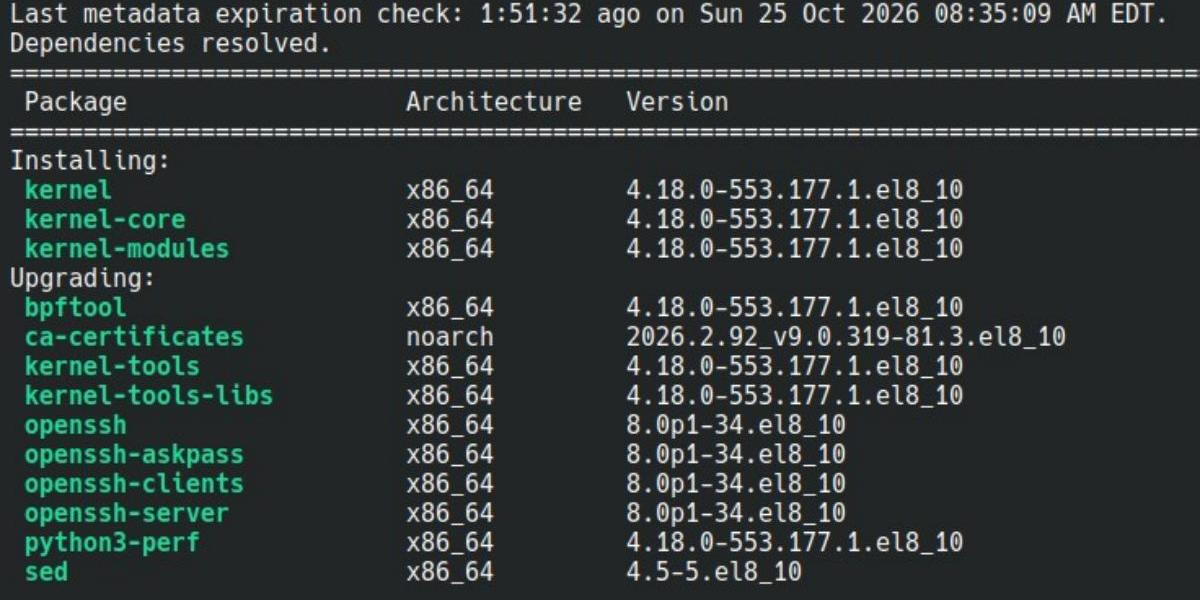
I installed 14 full updates to all of our corporate servers in October alone, a total of 21 since Sept. 2. After each one, I need to check everything on each server to ensure that nothing was broken.
All I can say at this point is to watch for updates and install them.
Your No. 1 enemy is complacency. “We’ve never been hit before; it can wait over the weekend.” No. It can’t. You may have to do some of this after hours to prevent downtime during the workday, but hey, that’s part of the job!
Why these bugs?
AI is finding bugs in old code, some of which are in function calls that are no longer maintained and have long since been forgotten.
Additional hilarity: the Bad Guys are using AI to find the bugs as well, so it’s a critical race.
For those of you who have programmed in C, the ancient “gets()” function is a good example. It simply reads input without limiting the number of bytes received. It can easily be used to overflow memory and write code that can then be executed.
At the end of the day, computers store and move information as numbers and early designs were called “calculators” for a reason.
For example, the number 49 (00011001 in binary) could represent the ASCII letter “A,” a byte from an image file or an instruction for the processor, such as “add” or “branch to a different address.”
It all depends on the context, location in memory and how it’s interpreted. (If you want to see hilarity in action, watch what happens if the instruction pointer jumps off the rails and starts executing a text file. Ask me how I know.)
Even though it’s considered bad practice nowadays, some older programs allowed data to overlap the executable instructions in memory.
With modern protected processes, this should cause a fault (e.g., the classic Windows Blue Screen of Death). But by cleverly placing the bogus instructions in memory, the Bad Guys can sometimes find ways around that.
Memory notes
As microprocessors became faster and faster, routinely clocking at 1 GHz and higher, other optimizations became necessary.
My fellow engineers might get a good chuckle out of the fact that the traces that carry the signals on a modern motherboard have to be treated as RF transmission lines with proper termination. In many cases, serial data, rather than parallel (example, 16 or 32 bits on separate traces) is better because there’s less concern about a bit from trace 1 arriving before the one from trace 2, or crosstalk between traces.
Caching is another good example. RAM is faster than hard drives, local caches (such as the Level 1, 2 and 3 caches in a modern processor) are much faster than RAM, and the latest processors even try to guess what’s happening next. They’ll preload an entire string of instructions into uber-fast cache memory. Some processors can now execute more than one instruction at a time, too.
I have suggested in the past that you learn to think like a Bad Guy. Can you imagine what a hacker might do if he/she can access a cache buffer?
Beware of malicious apps
A final warning about finance, budget and banking apps.
Make sure you only use apps provided by your financial institution. There are all-in-one apps now that want to tie all of your accounts together for convenience. Not surprisingly, this makes the banks very nervous.
Even if the app is legit, what could happen if someone compromises your phone? And remember, in addition to protecting yourself, you’re protecting our company. If you do work on your smartphone or laptop and get hacked, that might be a Very Bad Thing.
One of these “all-in-one” apps that advertises locally brags that it can move money from one account to another, or even obtain a loan for you. If that doesn’t raise red flags, I don’t know what will.
Again: Even if the app is completely legitimate, other apps may not be. Whenever you install a new app, carefully look at what it wants to do. If it asks for permission to look at your contacts, email and text messages, that should concern you.
Comment on this or any article to [email protected].
A version of this article originally appeared in Crawford’s “Local Oscillator” newsletter.