The recent FCC order on “EAS cybersecurity” reaches much further into the air chain than its alerting origins suggest. Some of its shortest phrases may require the most work.
This article presents 10 things for you to do before the Sept 29 deadline, plus some questions the industry still needs answered.
The phrase “EAS cybersecurity” makes this sound like a rule about one box. It isn’t.
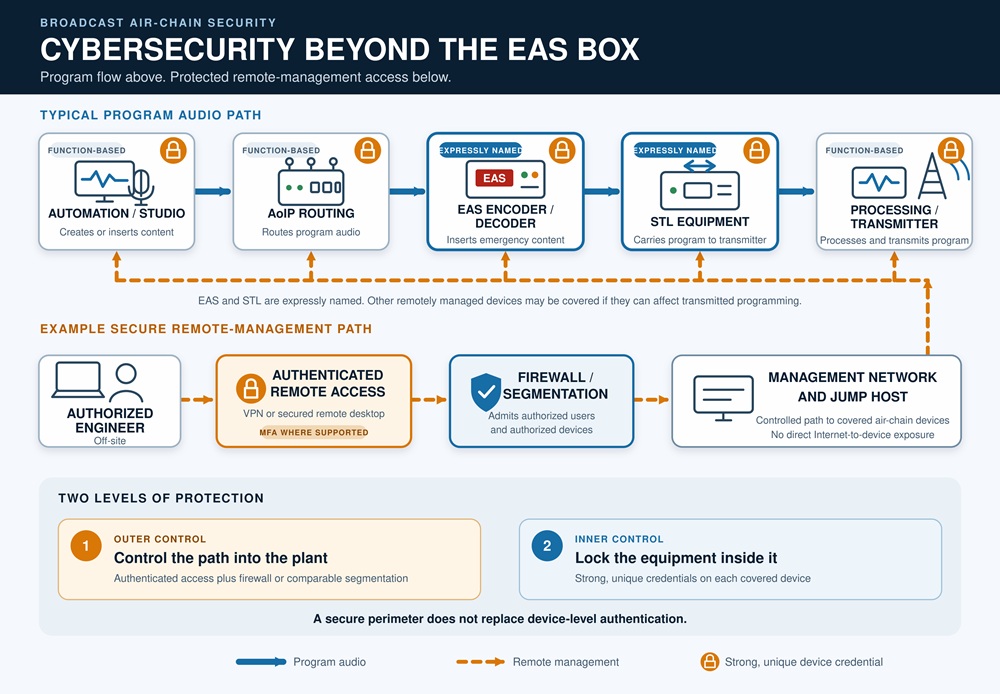
Yes, it covers the EAS encoder/decoder. It expressly covers STL equipment, too. Then comes the language that should make each of us chief engineers stop and take inventory: remotely managed equipment that routes, processes or inserts content into the programming transmission.
In a modern radio plant, that may include automation, codecs, audio processors, remote controls, RDS encoders and a fair piece of the AoIP system.
One sentence in Washington can turn into dozens of passwords, several maintenance windows and a long talk with whoever owns the firewall.
There is a sound reason for the order. Attackers have reached improperly secured broadcast equipment and transmitted unauthorized audio, including EAS tones and SAME codes. Default passwords, exposed web interfaces and old firmware aren’t harmless shortcuts anymore.
The rule takes effect Sept. 29, 2026. It requires strong authentication, prompt installation of security updates and a firewall or comparable segmentation practice that restricts remote management to authorized devices and users.
Simple enough on paper. Now take it into the broadcast facility.
1. Separate the final rules from the proposals
FCC 26-38 runs 101 pages because it is both a Report and Order and a Further Notice of Proposed Rulemaking. Much of it discusses ideas that aren’t requirements yet, including broader EAS modernization and message authentication. [You can learn more about those separate proposals in Radio World’s four-part series.]
The binding cybersecurity language is much shorter. New paragraph 47 CFR 11.35(d) contains the three basic controls: authentication, security updating and restricted management access.
The commission did not adopt the proposed requirement for a full cybersecurity risk-management plan. It also declined to require annual certification or reports of unauthorized access. Multifactor authentication, role-based access, backups, incident-response plans and equipment replacement weren’t imposed as universal requirements.
Many of those measures are still good practice. But station managers need to know which items are tied directly to the rule and which belong to the station’s larger IT security program.
2. Inventory anything that can touch the transmitted program
Start with a spreadsheet. Fancy asset-management software can come later.
For every potentially covered device, record its function, location, make and model, software or firmware version, management method, network segment, credential owner and update source. Include any public exposure or remote-access path.
EAS and STL equipment are specifically named. The third category is defined by what a device does: remotely managed equipment capable of routing, processing or inserting content into the transmitted program.
The first question isn’t whether the device normally handles an alert. Ask what could happen if somebody took control of it. An automation server, codec, processor or networked AoIP endpoint may be every bit as important as the EAS unit.
I wouldn’t begin by arguing devices off the list. Put them on it first. Decide their status once the whole air chain is visible.
3. Treat “remotely managed” broadly for now
The order doesn’t draw a clean boundary around remote management.
Does it mean accessible from the public internet? Does a VPN count? What about a jump computer, a vendor web access or a web interface reachable only from another machine on the private LAN?
Until the FCC says otherwise, the conservative reading is to include network-managed air-chain equipment even when its interface isn’t exposed directly to the internet.
Consider a plant with, say, 15 Axia xNodes. If all 15 can be managed over the network and can route or process program audio, a strict reading may place all 15 within the rule. That may mean 15 unique credentials, not one shared password for the xNode fleet.
This is where a short regulation becomes a weekend maintenance window.
If a station leaves a device off the list, it should be able to explain why that device isn’t remotely managed or cannot affect the programming transmission.
4. Map every path into the plant
An equipment inventory tells you what exists. A network map tells you how it can be reached.
Write down the public IP addresses, port forwards, VPNs, remote-desktop systems, vendor portals, cellular routers and temporary paths left behind after remote broadcasts. Check both the program connection and the related management interfaces. They may use different ports and present different risks.
Moving a service to an unusual port doesn’t make it private. Internet scanning is automated, continuous and cheap.
Try a practical test: What can be reached today from a computer or phone that the station hasn’t already authenticated and trusted? The answer is often longer and larger than expected.
5. Change default credentials, even behind the firewall
The order separately requires default passwords on covered equipment to be changed before that equipment is used for broadcasting. It doesn’t provide an express exception for equipment behind a VPN, management VLAN or credentialed jump computer.
A locked front gate doesn’t turn a factory password into a good password.
Change the defaults. Disable accounts that aren’t needed. Put the replacement credentials in a station-controlled password vault, not a text file on somebody’s desktop or a label stuck inside the rack door.
A secure perimeter still matters. But within the current rule, it doesn’t appear to cancel the authentication requirement on the equipment inside it.
6. Plan for unique credentials at device scale
The FCC’s password standard requires at least 15 characters. A password also may not be reused for the participant’s other accounts, equipment, applications or services.
On a strict reading, 15 covered Axia xNodes require 15 passwords. Add codecs, processors, remote controls, automation servers and EAS units, and password management becomes a job of its own.
This isn’t a memory problem. It calls for a managed password vault with controlled sharing, access removal, auditing and emergency recovery. After all, somebody still has to get into the transmitter site when the chief engineer is on an airplane.
The rule doesn’t require passwords to be changed on a schedule. It calls for a change when the participant has reason to believe a password has been compromised. That avoids the familiar progression from Transmitter1! to Transmitter2!. It still requires a procedure for departures, vendor access, accidental disclosure and suspected credential theft.
7. Deal honestly with the dictionary-word problem
The FCC defines a strong password as one containing at least 15 characters that “does not use dictionary words.” It doesn’t identify the dictionary or explain how words are detected. It also doesn’t address whether the “dictionary” is an English dictionary.
If read as a ban on any dictionary-word substring, the rule becomes unwieldy very quickly. “A” and “I” are dictionary words. So are many two-letter combinations. A random 15-character password could contain one by accident.
Long passphrases create a more practical conflict. Several unrelated words can produce a memorable, high-entropy passphrase, yet the FCC language appears to disallow dictionary words.
The order cites NIST, but NIST Special Publication 800-63B-4 describes a different test. NIST tells verifiers to compare the entire proposed password against a blocklist of common, expected or compromised values. It specifically says to compare the whole password rather than search for words contained within it. NIST also discourages extra composition rules.
That doesn’t give a broadcaster permission to substitute the NIST wording for the FCC rule. Until the commission explains what it intended, a unique machine-generated secret stored in a password manager is the least debatable approach when the equipment supports it.
A station trying to follow the most literal interpretation could configure its password generator to reject dictionary strings, including one- and two-letter entries. The fact that this is even a serious compliance discussion shows exactly why clarification is needed.
(Update on Sept. 22: After the rule was published, the FCC clarified in an FAQ that dictionary words may be used as part of a multiword passphrase, provided the complete passphrase is at least 15 characters long. That guidance brings the FCC’s practical interpretation closer to NIST’s recommendations, although it is difficult to reconcile with the rule’s unqualified statement that a strong password “does not use dictionary words.”)
Then there is the legacy-equipment problem. Some products won’t accept 15 characters.
The rule permits an alternative authentication method reasonably sufficient to prevent unauthorized access, including one-time or cryptographic methods. A VPN and hardened jump host protected by MFA may be part of that design. The order doesn’t clearly say that a firewall alone cures a short device password. It also doesn’t erase the separate requirement to change a factory default.
If alternative authentication is necessary, document the equipment limitation, the compensating controls and why the resulting design is sufficient. Legal guidance may be warranted, too.
8. Make the firewall a policy, not a purchase
Most stations already own a router with firewall capability. The real question is how its firewall rules are written.
Which source devices and users may reach each management service? What happens to everything else? A good design may include a management VLAN, a physically isolated management network, a site-to-site VPN, maintained IP allowlists (whitelists) or a hardened jump host protected by MFA.
Do not confuse a separately firewalled perimeter network — sometimes called a DMZ — with the “DMZ host” setting found in the web interface of many small routers. That setting may forward nearly all unsolicited inbound traffic to one designated device. Do not put any air-chain equipment behind that consumer-router DMZ-host setting. Eliminate exposed web interfaces and stale port forwards instead.
A gated remote-desktop computer can be a sensible way to administer an AoIP network. Segmentation, however, doesn’t automatically waive the separate credential requirements on the devices behind it.
9. Turn patching into a standing job
Covered equipment must receive manufacturer-issued security patches and security-related software or firmware updates promptly.
“Promptly” doesn’t mean loading new firmware into the only working air chain at 4:55 Friday afternoon with no rollback file. The order allows testing, provided the testing begins promptly and finishes within a timeframe consistent with industry best practices.
Somebody has to own this job. That person receives vendor notices, evaluates the exposure, preserves the current configuration, tests the update, schedules installation and records the result. If installation must be delayed, write down why and what temporary protection was added.
The final rule doesn’t impose a blanket requirement to replace end-of-life equipment. However, that isn’t much comfort when a product has a known vulnerability and no vendor support.
Isolation, removal of remote management or replacement may be the only sensible answers. Put that replacement into the facility manager’s budget meeting before the unsupported box becomes an emergency purchase.
10. Review remote workflows and keep the evidence
Remote voice tracking illustrates some of the operational questions that remain.
An automation system plainly inserts content into the program. A talent user recording or sending a voice track isn’t necessarily performing “remote management.” The FCC doesn’t expressly require every remote user to receive task-specific permissions. It also doesn’t specifically require the automation system to prevent talent from changing the real-time log.
Even so, least privilege is the safer arrangement. Give talent, vendors and contractors only the access their work requires. Remove dormant accounts. Separate content contribution from system administration where the product allows it. If the automation system can’t make that distinction, record the limitation and control access somewhere else.
Keep evidence of the work. The new rule doesn’t create an annual filing or certification. A device inventory, network diagram, password-change record, patch log and firewall review can still show what the station did. Record that a password was changed, not the password itself.
Good documentation also helps the next engineer understand the plant. “Dave set that up around 2019” is not a recovery procedure.
The unclear parts are still unclear
The FCC calls these controls minimally burdensome and estimates an average annual burden of about 10 hours. That may fit a small facility with a few covered boxes. It will sound optimistic to anyone responsible for a multi-station AoIP plant, several transmitter sites and a network inherited from three previous engineers.
The FCC should clarify what it means by dictionary words, where remote management begins, when system-level authentication satisfies the alternative-authentication clause, and how it expects stations to measure prompt patching.
Industry questions and possible petitions don’t stop the calendar. Unless the commission grants relief, Sept. 29 remains the effective date.
By then, somebody at the station should be able to produce the device inventory, show the management-access rules, open the patch log and explain how credentials are controlled. No hand waving. No “I think Bob has that password.”
Documentation won’t stop an attack. It makes the controls repeatable and gives the next engineer a fighting chance when the phone rings at 2 a.m.
Primary sources
- FCC 26-38, Report and Order and Further Notice of Proposed Rulemaking, especially paragraphs 13-32 and Appendix A.
- Federal Register final rule, 91 FR 48289, published July 31, 2026.
- NIST Special Publication 800-63B-4, Digital Identity Guidelines, Section 3.1.1.