Supply Side is an occasional feature that introduces readers to companies or products with which they might not be familiar.
“AudioRoute captures the audio a computer is already playing and puts it where you need it, without changing how the machine plays audio.”
So says Arvital Audio, its developer. We asked founder Vitaliy Yunikov for details.
Radio World: What is Arvital Audio?

Vitaliy Yunikov: Arvital Audio is the brand we publish under. The company behind it is Arvital Soft d.o.o., a software development company registered in Croatia.
RW: What is your background?
Yunikov: I am an engineer and an engineering leader, with about 20 years in the industry. Most of that time has been spent in C++, and a good deal of it on audio and video specifically: processing, recording, transmitting, encrypting and much more.
AudioRoute sits directly on top of that experience, which is why it is built on the operating systems’ own capture interfaces, not on a virtual cable.
RW: What prompted you to develop it?
Yunikov: My son. He is a musician and started learning music production fairly recently, working in Ableton Live and Logic. He asked me what seemed like a simple question: How do I record the audio my computer is playing straight into the DAW?
The honest answer was that there was no straightforward way. You install a virtual cable, you route your output through it, you build an aggregate device, you record and then you put everything back the way it was.
I found that a strange thing to have to explain to someone who just wanted to sample a few seconds of a track, so I wrote the tool I would have wanted to hand him.
RW: So what is it and how does it fit into professional audio workflows?
Yunikov: AudioRoute captures the audio a computer is already playing and puts it where you need it, without changing how the machine plays audio.
The important part is that it taps the audio in parallel with playback rather than sitting in the playback path. Your output device is not changed, your monitoring is not interrupted, and no latency is added to what anyone is listening to. Nothing has to be undone afterwards, which matters most in rooms where the next person to sit down is not the person who set it up.
It works three ways, and they are the same capture underneath:
- As a plug-in on a DAW track, in VST3, Audio Unit and AAX. The audio arrives on the track ready to record.
- As a virtual input device. “AudioRoute Input” installs as an ordinary recording device, so anything that can record from a microphone can record computer audio instead.
- As a menu-bar or tray recorder, straight to WAV, for when no DAW is open.
You can also choose which applications are captured rather than taking the whole system mix, and set a level for each one, so several sources can be balanced before they reach the recording.
Under certain circumstances described in our guides, audio can be recorded bit-perfect on Windows and Mac, meaning that there is absolutely zero quality loss or resampling on its way.
RW: You mentioned getting surprising interest from the broadcast side. What should radio engineers know?
Yunikov: Four things.
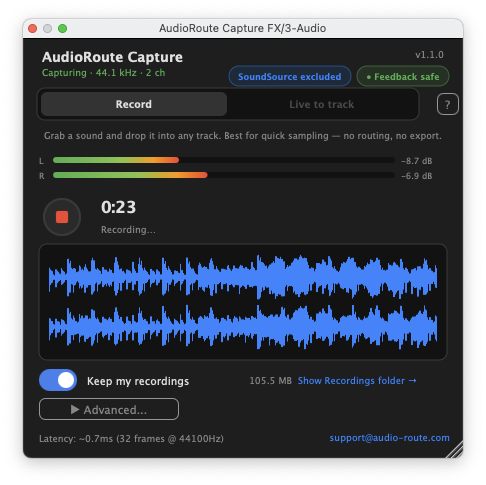
First, “AudioRoute Input” presents as a standard Windows recording endpoint. A good deal of playout and automation software only enumerates the older Windows device interfaces, so it will not see modern virtual devices at all. Ours shows up in those lists like any sound card input.
Second, the Windows driver is attestation-signed by Microsoft. That matters on managed and locked-down machines, where an unsigned driver is simply not an option.
Third, capture is per application. You tick the applications you want and only those are recorded. A desktop notification, an alert or a second player cannot reach air, because it was never part of the capture in the first place. In a studio that is usually the difference between usable and not.
Fourth, it does not take over the output device, so the machine’s normal monitoring keeps working while it captures.
The honest limitation: On Windows, an application that outputs through ASIO in exclusive mode bypasses the Windows mixer entirely, and we cannot capture it. On macOS the floor is macOS 14.2, because that is where Apple’s per-process capture interfaces begin.
RW: Do you have examples of broadcast organizations using the tool?
Yunikov: There is one I would rather not name because I have not asked their permission and I do not think it is mine to give. What I can tell you is that a national public radio broadcaster bought a license in August after their engineer found us, worked out the constraint himself and got in touch. They are testing it now with the possibility of extending to more workstations if it does what they need.
RW: How is it sold and what does it cost?
Yunikov: Direct from our website. It is 29 euros, paid once, which covers both macOS and Windows and includes future updates. There is no subscription. There is a 14-day trial and it does not ask for a card. That is the consumer license for individual users.
For stations that consumer license is the wrong shape, so there is a second way to buy it. It is an annual subscription, priced per machine not per user, which matches how a studio actually works: the license belongs to the workstation, not to whoever happens to be sitting at it that shift.
What comes with it is the deployment as much as the software. It is licensed per machine not per person, which is the right unit for a studio. A workstation is licensed once and everyone who sits at it is covered, so 10 people sharing four workstations is four licenses, not 10. The organization’s license key is delivered by policy through Intune, which means nobody at a workstation ever sees a license key to enter or to lose. We supply what is needed to deploy it as a managed application, including an ADMX template so our settings appear in the Intune admin interface as named policies not a raw strings an engineer has to hand-write, and the station decides which of those are defaults an operator may change and which are enforced.
On our side we track the machines, so billing follows the actual count not an estimate, and the organization gets a regular summary of which workstations are in use against the agreed number. Going over that number never stops a recording. We see it, they see it and it is settled at renewal, because a newsroom machine refusing to record on the day a colleague deployed one more copy is not an acceptable outcome.
It also keeps working when it cannot reach us, so license reporting never stands between an operator and their work.
The agreement includes priority support direct to me, bug fixes and small improvements during the term, and invoicing against a purchase order not a card.
There is no published price, because it depends on the number of machines and other organization requirements. An engineer who emails us gets a number.
RW: What else should we know?
Yunikov: It is cross-platform and behaves the same on both. macOS 14.2 or later on Apple Silicon and Intel, Windows 10 or later including Windows on ARM.
To the best of my knowledge we are the only virtual audio driver of this kind shipping native ARM64 on Windows, and I would be glad to be corrected on that.
It records at 44.1 up to 192 kHz at 16, 24 or 32-bit float, and it is bit-perfect when the rates match, which is the case people care about when they are archiving rather than monitoring.
There is no kernel extension on either platform. It is built on CoreAudio process taps on macOS and WASAPI process loopback on Windows, which is to say the interfaces the operating systems provide for exactly this, rather than a driver pretending to be a sound card in the signal path.
What it deliberately does not do is capture microphones. A microphone goes into the desk or the DAW the way it always has. We handle application audio.
And we write a setup guide for every host. If an engineer is going to try this on a Tuesday afternoon between shifts, the difference between a guide for their exact system and a generic one is the whole difference.