This is one in a series of articles about best practices in audio processing for radio OTA and streaming.
The author is senior product development engineer for Wheatstone.

The streaming codec’s job will tell you just about everything you need to know about a streaming audio processor’s job.
The codec’s job is to remove subtle audio details to get the bitstream to “fit” within the constraints of a typical internet link. The smaller the bitstream, the more aggressively it must remove audio to make it fit.
To their credit, perceptual codecs do a pretty good job of removing details we probably wouldn’t hear anyway … unless the wrong audio processor gets ahold of it.
If you’ve ever used an air chain processor for streaming, you probably know what I’m talking about. On-air processors are the worst processors for streaming because they trick the codec into mistaking its normal processing artifacts for audio; clipping distortion byproducts and non-audio signals are treated just like audio by the codec and often even amplified by it.
Still, you’re going to need to process your internet streams for all of the same reasons you use processing for your on-air signals. Just like your on-air signal, those streams need to be processed for level consistency, spectral balance and absolute peak control too and to keep the codec’s input level below 0 dBFS (above that point you’re “out of bits”).
[Related: “Special Report: Views on Processing From Out in the Field”]
Here are a few things we’ve learned in our many years of streaming and audio processing, both in the field and experimenting in Wheatstone’s audio processing lab.
Aggressive compression can interfere with the codec
Fast time constants can create intermodulation distortion products, which the codec can then mistake for audio and spend bits on instead of the actual audio. This issue is especially bad for low-bitrate streams that don’t have a lot of data bits to begin with.
Unlike the conventional broadcast approach to build uniform loudness and density from one music source to the next, a good streaming processor uses audio control techniques that won’t interfere with codec performance.
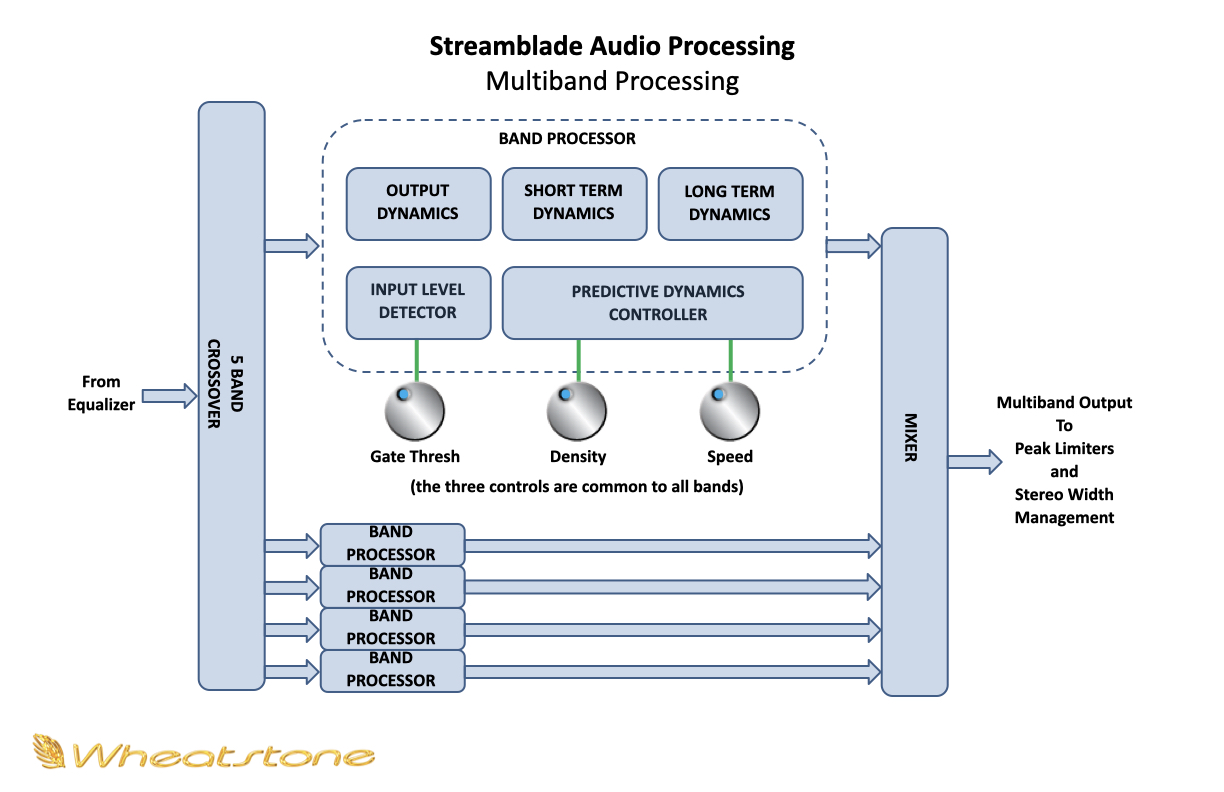
For example, at Wheatstone we use automatic program density calculations to manage the five-band AGC in our streaming appliances to feed the encoder more consistent audio levels without artifacts that could fool the codec. We use predictive dynamics control and even some neural network techniques to create extremely natural management of program dynamics and spectral balance.
There will be overshoots, you’ll need a limiter made for streaming
The encoder will not accept any signal over 0 dBFS. The best practice for most codecs is to stay below –3 dBFS on the input to the codec and that’s why a limiter is necessary to stay below 0 dBFS. But not any old limiter will do. Aggressive limiting byproducts such as “pumping” and intermod are never good, but they’re especially problematic for encoded audio because the codec doesn’t know that those processing artifacts that we can hear aren’t audio and goes ahead and encodes them too, at the expense of real audio content.
A good streaming processor will manage audio peaks with as little distortion and artifacts as possible.
Forget about clipping
The problem with using clipping for peak control is that it creates distortion products that weren’t in the original program and the encoder doesn’t know any better, and it throws coding bits at it. A good limiter designed specifically for streaming is a much better option. Clipping is never recommended for peak control of streamed content.
For example, we use proprietary multiband peak limiters managed by Peak Energy Estimators to control peak energy without creating dynamics-related artifacts. Final limiting also occurs separately in two frequency bands to provide a great balance between high perceived audio quality and stream loudness.
By the way, for streams of very low bitrates, removing low frequencies in the stereo difference channel (L–R) can leave more bits available for encoding upper frequencies in the L–R that are more perceptibly useful.
Stereo, not so much
Keeping stereo separation consistent and steady gives listeners a great perception of stereo. But for very low bitrates, monaural is always the best answer so the codec can spend all its precious bits on listenable content. Adding a slight boost in bass can also offer some additional depth to monaural programs streamed at lower bitrates.
A good streaming processor will include features like stereo width management and on-air processor style bass enhancement in order to better match a station’s stream texture to that of its over-the-air sound.
You’ll need noise filters, EQ dynamics and vocal correction
Streamed programming at low bitrates can often benefit from some EQ adjustment. And like broadcast audio, it will require some noise filtering and asymmetry correction on vocals to make the most of the listening experience. A good processor for streaming will have all these tools, which is why we include in our streaming appliances a two-stage phase rotator to correct voice asymmetry, selectable high- and low-pass filters for removing noise and hum, and four-band parametric equalizer with peak and shelf functions for tailoring audio for the best possible quality at a variety of bitrates.
Start with native IP audio if you can
We’re an AoIP and an audio processing company, so I’d be the first to say that the beauty of AoIP is that you can take music programming straight from the playout system to air and web stream without stepping through a bunch of A/D/A conversions. That huge bump in audio quality is one of the more important benefits of installing an AoIP system so why not extend that benefit to your streams as well?
I recognize that not everyone has or wants an AoIP networked studio, and that’s okay, because our streaming appliances can accept AES and analog audio too. But, from a strictly codec point of view, ratcheting up the audio quality of what’s coming into the streaming processor is only going to help the codec perform and the audio stream sound its best.
Postscript: The streaming end game
It’s not usual for a streaming processor’s codec to operate at a 4:1 or higher compression. As far as those subtle audio details we mentioned in the article go, that means four parts in and one part out.
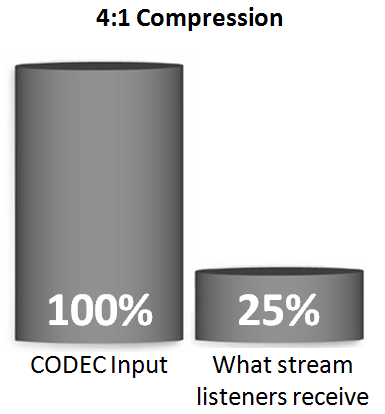
But because of how our human hearing works, a phenomenon known as “auditory masking” means that we never hear everything that’s in the audio anyway. Perceptual codecs capitalize on that by removing what we probably wouldn’t hear in order to reduce the amount of data that needs to be streamed.
Audio processors designed specifically for streaming will take auditory masking into consideration in order to manage audio levels and spectral balance and peak control in ways that maximize how great your station’s audio will sound over the internet.
Read more about processing for radio in a Radio World ebook “Trends in Audio Processing.”