Nick’s Signal Spot is a new feature in which Nick Langan explores RF signals, propagation, new equipment and related endeavors.
When I write about anything related to long-distance radio signal monitoring (DXing), it often comes attached with conflicting feelings.
Specifically, with my focus on the FM band, the dial has never been more crowded almost everywhere. You can still find some spots with a quiet RF noise floor, but you might have to drive a long time to get there.
But technology, in many ways, has never been better. Through software-defined radios, setup is simple, and with a decent receive antenna, you can capitalize when tropospheric ducting, e-skip or even meteor scatter opportunities cooperate.
In the past, timing really was everything. If an opening happened overnight, but you weren’t awake to hear it — unless you were running a cassette recording — as the old axiom goes, did it really even happen?
Now, since 2021, quite a few North American FM DXers are utilizing station RDS decodes to create a free, powerful autologger network, ensuring those overnight openings are no longer lost to the ether.
As of this writing, there are 86 active FM tuners online, from the Pacific Northwest in Seattle down to Bartow and Chipley, Fla., with representation in Alberta and Quebec, as well.
RabbitEars and TV bandscanning
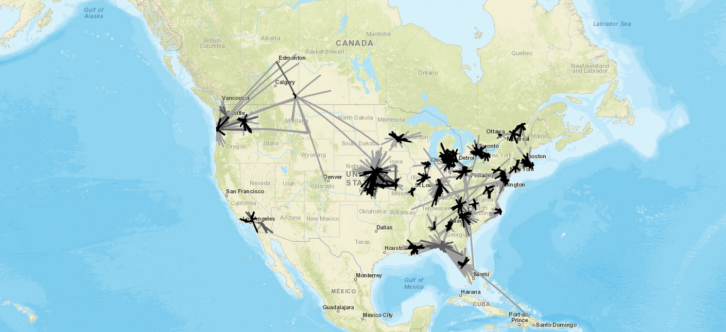
You may already know the value of RabbitEars.Info. Founded in 2008 and operated by Mark Colombo, it is the definitive resource for U.S. TV station listings and searches, featuring a highly useful signal search map.
In 2013, Colombo added a live bandscan feature requiring an HDHomeRun receiver and an always-on computer to report real-time digital TV reception to a live map. The architect behind this service, however, is Russ Dwarshuis (KB8U).
Dwarshuis had originally written software back in 2009 to automatically log TV reception from a SiliconDust tuner to his own website to detect tropospheric ducting. Four years later, Colombo connected with Dwarshuis and offered to host the code on RabbitEars.Info, officially launching the live bandscan feature.
In 2021, Dwarshuis expanded the project, introducing a comparable feature for the FM band.
How the autologger works
Our friend Loyd Van Horn of DX Central put together a very helpful tutorial on how to use a TEF6686 receiver with the RabbitEars.Info FM reception map:
If you want to jump in, you can either use a software-defined radio that supports the SDR Console software, which means you’ll need both an SDR and a computer.
Alternatively, thanks to the efforts of Les Rayburn, you can also use a TEF6686 that runs Sjef Verhoeven (PE5PVB)’s firmware, which we’ve written about. No computer is needed for this setup — the TEF, via its built in Wi-Fi, can report directly to RabbitEars.Info.
Dwarshuis explained to us the mechanics of the FM logging system, which are fairly straightforward and rely on RDS. His software commands the radio to tune to each broadcast frequency for a few seconds, scanning from the bottom of the band to the top.
As it scans, it collects any available RDS Program Identification codes. Once the radio reaches the top of the band, a payload containing the frequency, PI code and the time of reception is sent to RabbitEars.info, tagged with the user’s ID.
From there, the server takes over, thanks to code authored by Dwarshuis. It references a database to find a callsign that matches both the reported frequency and the PI code, subsequently plotting the results on a live map. If multiple stations share the same PI code and frequency, the system defaults to logging the geographically closest match.
The primary reference for matching these frequencies and PI codes is the Worldwide TV-FM DX Association database, which the system polls once a week for updates. If no match is found there, the server falls back on other publicly available data.
Because the system plots received stations on the map for up to 24 hours, users can easily review what rolled in while the radio was left unattended.
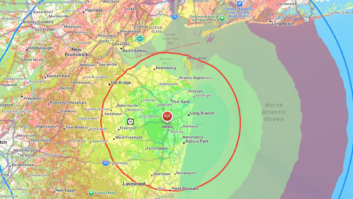
I’ve had so many success stories doing this. You can view my autologger map here, and click the “ever received” button to see all logs back to 2021.
I’m coming up on the two-year anniversary of a memorable trip with my father to Boston. I couldn’t sleep in our hotel room, and around 3:00 a.m. one late March night, I checked my autologger, stationed in New Jersey, and saw that it was receiving tropospheric ducting signals down to South Carolina.
I hadn’t been expecting such propagation at all.
Current caveats
There’s been quite a bit of debate in DX circles on whether what the autologger detects should go directly into one’s logbook. It is a sensitive subject!
I always just resort to common sense in these cases, which admittedly, doesn’t seem to come easy these days.
A log from Hawaii captured in Maryland on a night in January probably didn’t happen. But if you’re getting other stations from Denver and the autologger finds 103.5 KRFX(FM), I’d say that’s a log!
Dwarshuis is realistic about the FM autlogger’s current weaknesses:
- Incomplete RDS adoption: Not all FM stations transmit RDS data. Consequently, a significant number of stations simply fly under the radar and are not detected by the software.
- Inaccurate station data: Stations occasionally transmit the wrong PI codes. When this happens, it requires manual corrections to the WTFDA database to ensure future logs are accurate.
- False decodes: Even though the RDS protocol includes built-in error correction, the system is still susceptible to occasional false decodes, particularly when signals are weak or experiencing heavy interference.
He’s also sought an enhanced interface and encourages anyone with programming experience and passion to review its code on GitHub.
Getting involved
For those looking to join the free network, the community has streamlined the onboarding process. Rayburn has graciously agreed to set up accounts and provide configuration information specifically for users running TEF6686 radios, and he can be contacted directly for assistance.
Rayburn did caution that version 2.20.8 of the PE5PVB TEF firmware has a different connection setup for Wi-Fi, and Rayburn is working on adjusting his instructions for this process.
For DXers who prefer to use SDR Console, step-by-step setup instructions are available at the RabbitEars join page.
[Read the Signal Spot from Nick Langan for More DX-Related Stories]