DHD has released a utility designed to increase the efficiency of its audio mixing systems during installation and subsequent configuration.
Managing Director Marc Herrmann was quoted in the release: “Anyone who has commissioned a DHD system knows the question: ‘A new device joins the network, so what’s its IP?’ Our established DHD Toolbox application has always had the answer but a lightweight utility in your tray is simply more comfortable for that quick look. And it shouldn’t require Windows.”
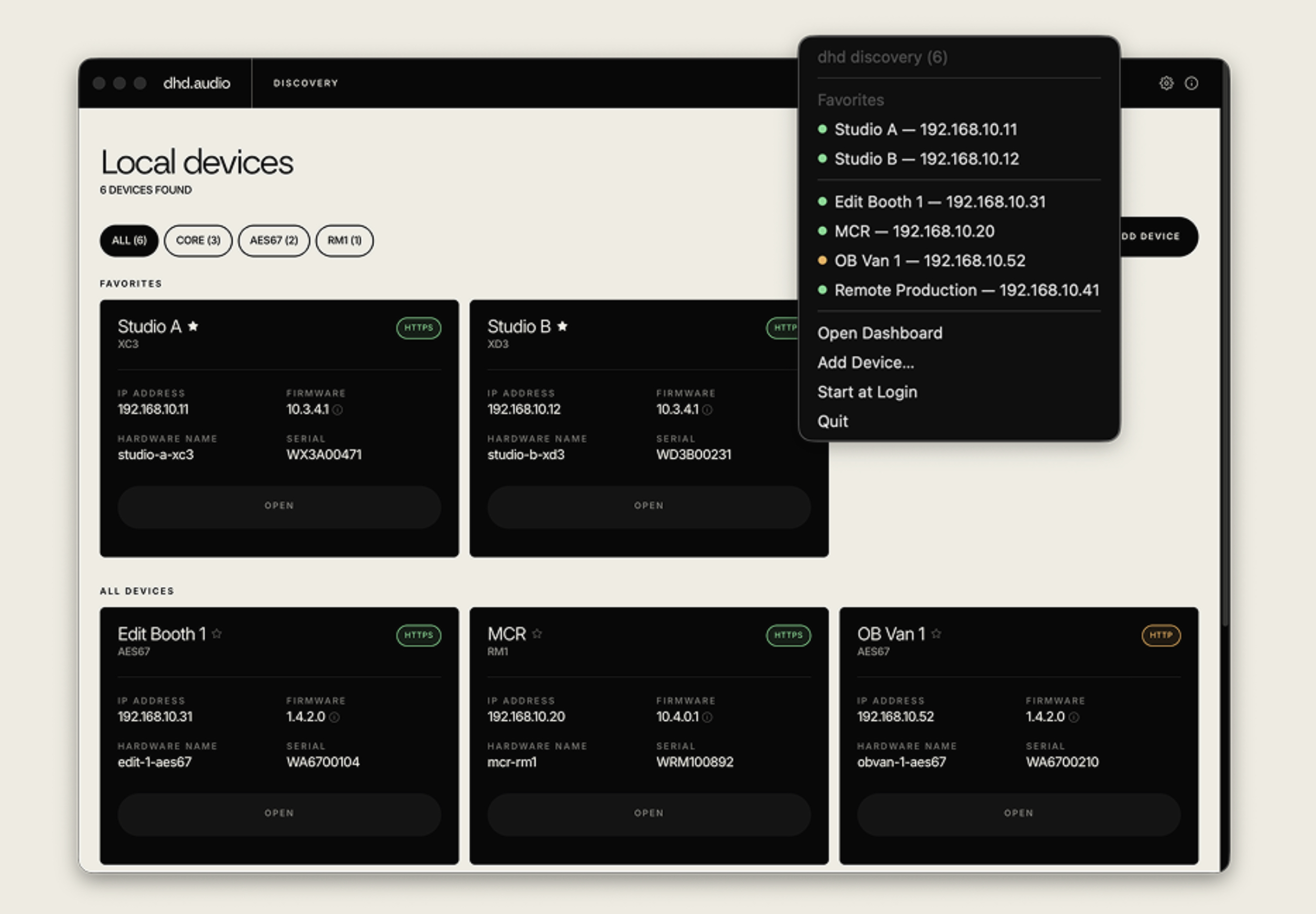
A new tray app called DHD Discovery, shown, runs in the background. It uses the Multicast DNS decentralized networking protocol and watches your network. It shows any DHD device when it comes online, including DHD cores, RM1 broadcast-from-anywhere interfaces and audio-over-IP devices connected via AES67/Ravenna or Dante.
A click opens the device’s web apps. Everything can be seen at a glance, such as a local dashboard with IP, firmware, serial and connection status, favorites, search, filters and manual entries for other subnets.
Each attached device can be reached via a click. Any device’s web apps can be inspected from the tray or the dashboard without need to type IP addresses into the browser.
It is free for anyone working with DHD systems. The Discovery app is available for macOS 12+, Windows 10+, or a modern Linux distribution with FUSE support.
IBC Booth: 8.B4